

Traxxas Telemetry Expander Install Guide (Rustler 2WD / 4×4 Setup + App Configuration)
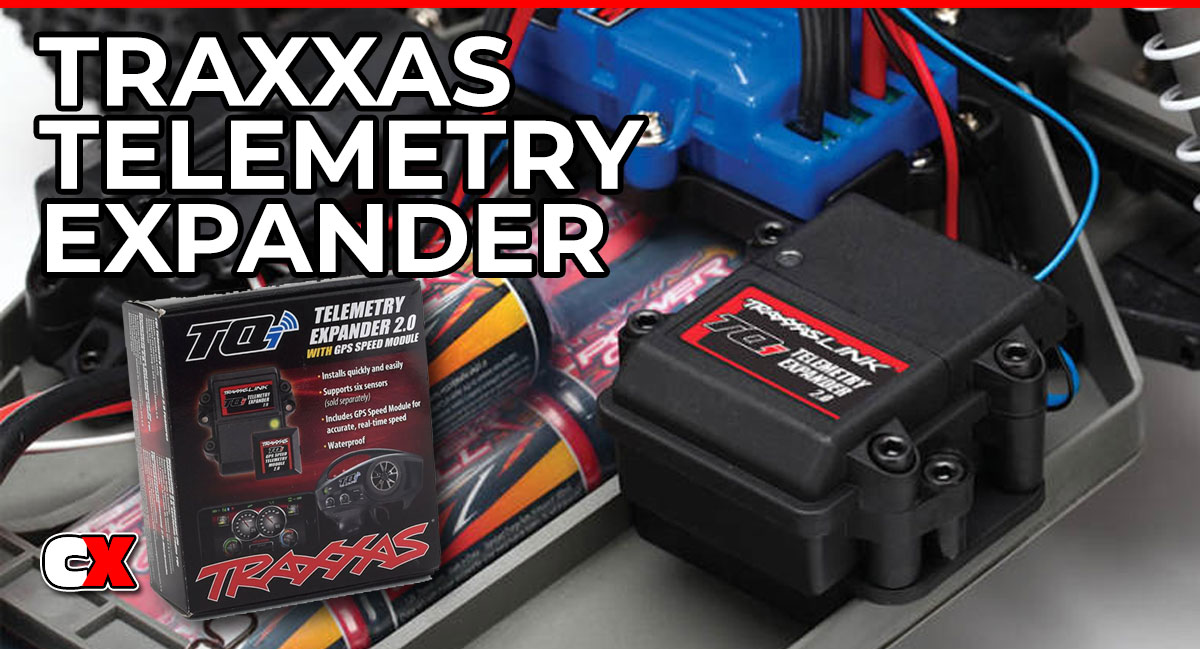
What Is the Traxxas Telemetry Expander System?
The Traxxas Telemetry Expander is an upgrade that allows your RC vehicle to send real-time performance data directly to your transmitter and mobile device.
When installed in any Traxxas vehicle, it expands the capabilities of the standard receiver by allowing multiple sensors to be connected at once. This turns your RC car into a data-driven platform instead of just a basher.
This system is designed to work with the Traxxas TQi radio system and the Traxxas Link app, giving you live feedback while you drive.
For this article, I’ll be installing this system into my Traxxas Rustler Courtney Force edition truck, along with the GPS Speed Module and TQi Wireless Link Module.
What Data Can You Track?
Once installed, the telemetry system can monitor:
• Speed (with GPS module)
• Motor temperature
• Battery voltage
• RPM (optional sensor)
• ESC temperature (model dependent)
For Rustler owners, the most useful data points are speed, temperature and voltage. These directly affect performance, durability and tuning decisions.
Parts and Compatibility Checklist
Before starting, make sure you have everything you need.
Required Components
• Traxxas Telemetry Expander (2.0 recommended)
• Traxxas TQi transmitter
• Traxxas Wireless Module (for app connectivity)
• Compatible Traxxas receiver (typically TSM-enabled)
Recommended Add-Ons
• GPS Speed Module (for accurate speed tracking)
• Temperature sensor
• Voltage sensor (if not integrated)
Rustler Compatibility Notes
• Works with both Rustler 2WD and Rustler 4×4
• Waterproof receiver box requires careful wire routing
• VXL systems offer more useful telemetry data than brushed setups
Before You Start
Skill Level
• Beginner to Intermediate
Time Required
• Roughly 20-40 minutes
Tools Needed
• 1.5mm and 2.0mm hex drivers
• Small Phillips screwdriver
• Needle nose pliers (optional)
Key Tips Before Installing
• Work in a clean, well-lit area
• Double-check waterproof seals before closing the receiver box
• Plan your wire routing before installing anything
Step-by-Step Installation Guide
Step 1
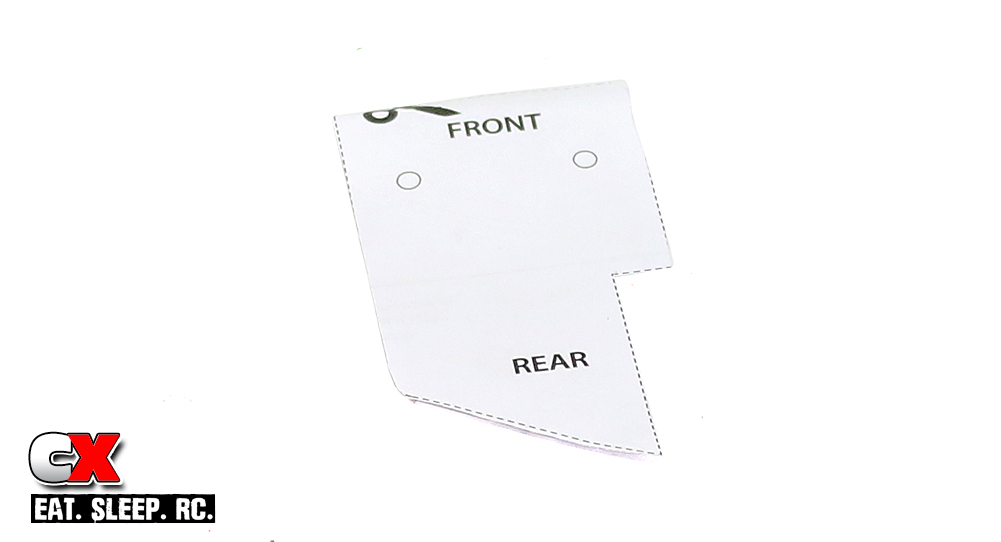
The Traxxas Rustler doesn’t come with a spot to mount the Expander unit. Instead, the mount itself is an additional part that must be purchased. The package includes an instruction sheet that has a template for drilling holes in the chassis. Our first step is to cut that template out.
Step 2
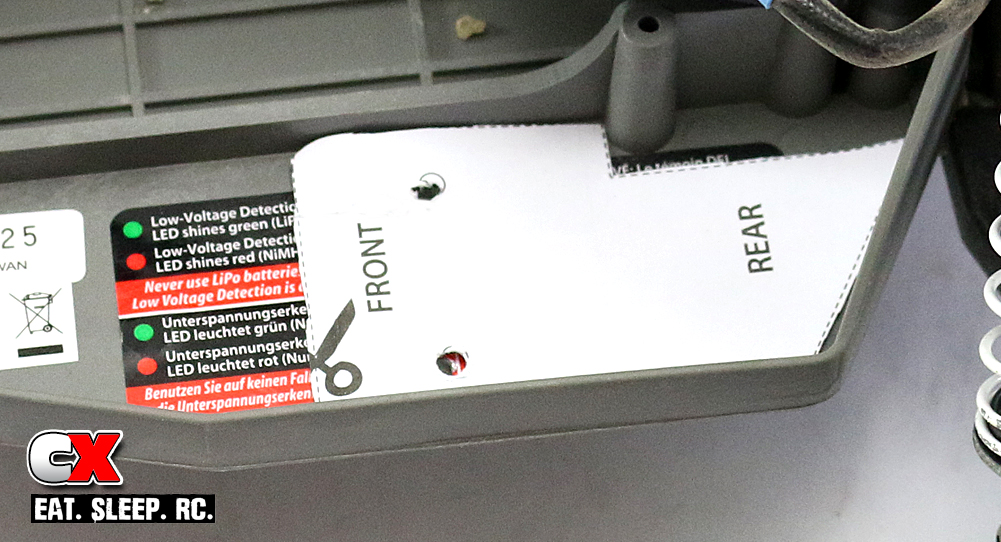
Take your trimmed template and place it in the chassis as shown. It’s not necessary to tape the template in place but it does make it a little easier to make the holes with two hands on your drill.
Step 3
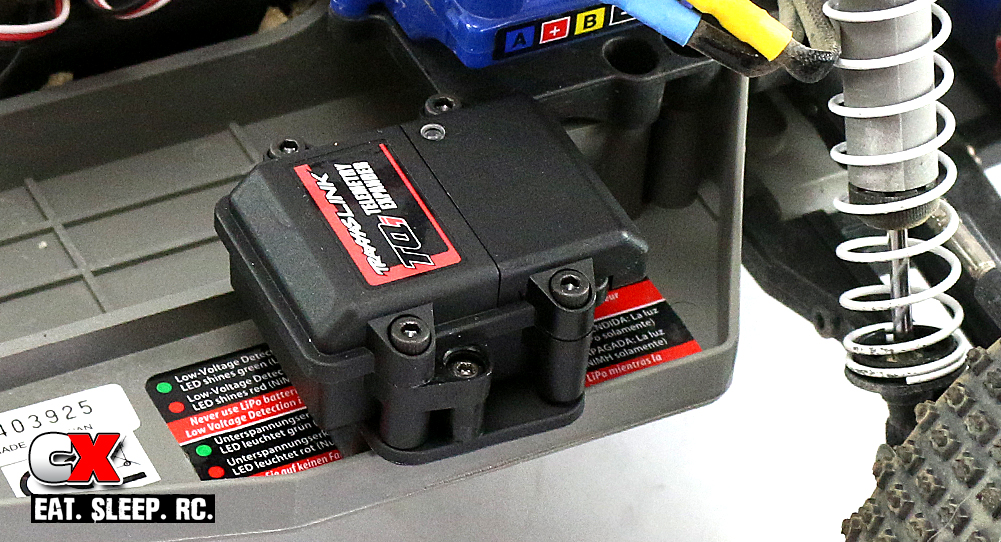
Remove the paper template and attach the mount to the chassis, using screws from underneath to secure it in place. Now insert the Expander into to the mount.
Step 4
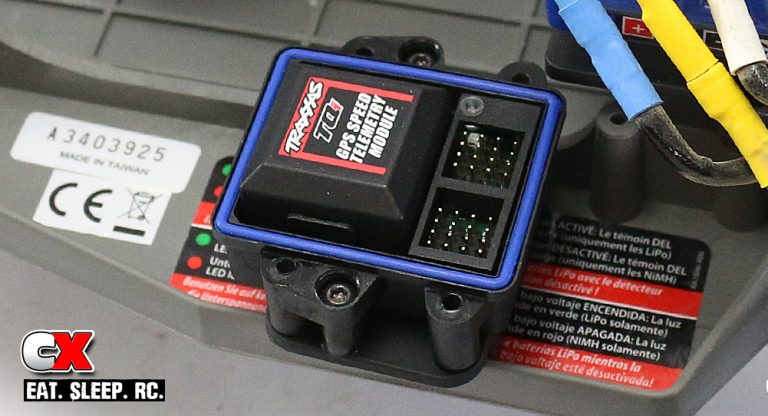
Remove the covers on the Expander (there will be two of them – the main cover and the wires cover) and carefully press the GPS Module in place. You will need to line the pins up so make sure you do this slowly so you don’t bend a pin and ruin the Expander. Press the GPS Module in until you hear a ‘click’. Now re-install JUST the main cover – leave the wires cover off for now.
Step 5
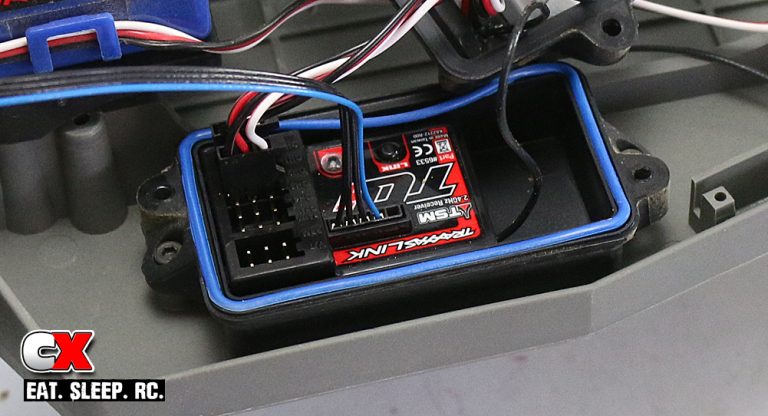
Remove the cover on your receiver box and insert one end of the 425mm communication cable into the port shown (next to the TSM logo). Note how the wires coming out of the receiver box are routed.
Pro Tip: Take a quick photo before unplugging anything. This helps if you need to reverse your steps. Make sure the connector is fully seated and the wires are not twisted or under tension.
Step 6
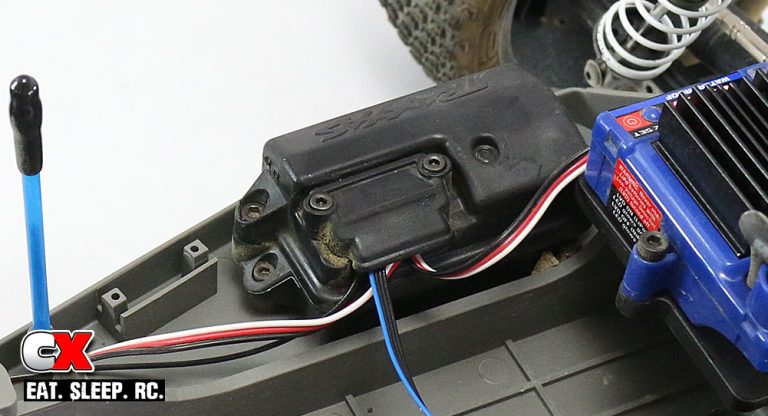
Re-install the cover, routing the original wires and your new communication cable as they were in Step 5. Tighten the screws evenly.
Avoid:
• Pinching wires under the lid
• Crossing wires over the gasket
• Tight bends that stress connectors
Step 7
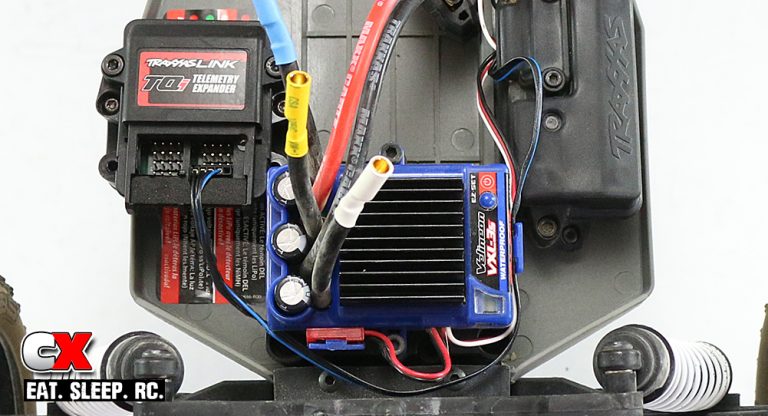
I wrapped my communication cable around the ESC to reach the Expander. You can zip tie it to the ESC wire or, as I did, feed it into the clip on the side of the ESC. Once routed, plug the communication cable into the port shown; this is the ONLY port you have available for this cable. The rest are used for additional sensors and will cause an error in setup if you plug the comm cable into any of them.
Now replace the wire cap on the Expander unit.
NOTE: I disconnected all the motor wires to make it easier to see the installation – this is not something you are required to do.
Step 8
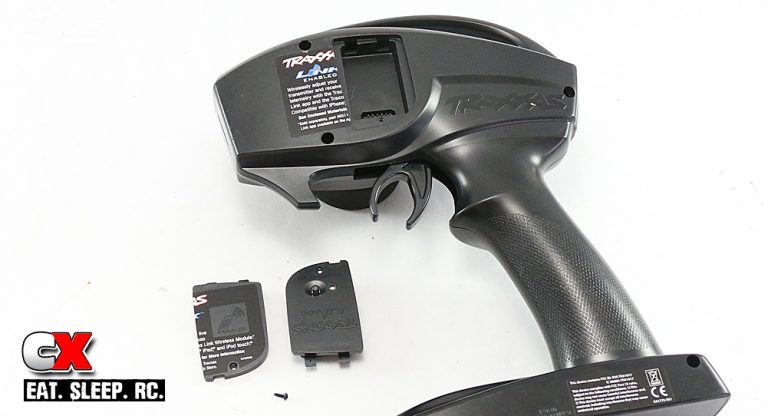
Now that we’re done with the Expander unit, we need to hook up the BlueTooth to the TQi radio. Flip your radio over and carefully cut the sticker along the edge of the Link Module cover. Remove the small screw to release the cover and replace with the Wireless Link Module. Use the small screw (or the one included with the module) to secure it in place.
At this time, the Expander will only show you Speed and your recorded Top Speed. The battery voltage, temp and RPM won’t show on the app until you install those sensors.
Setting Up Telemetry in the Traxxas Link App
Once installed, power on your Rustler and connect your transmitter to the Traxxas Link app.
Setup Steps
• Open the app and connect your transmitter
• Navigate to the telemetry dashboard
• Allow the app to auto-detect sensors
• Assign and label sensors if needed
• Calibrate GPS (if installed)
What to Check
• Live voltage reading
• Temperature updates
• Speed tracking (if GPS installed)
If data appears correctly, your system is ready.
How to Use Telemetry for Tuning
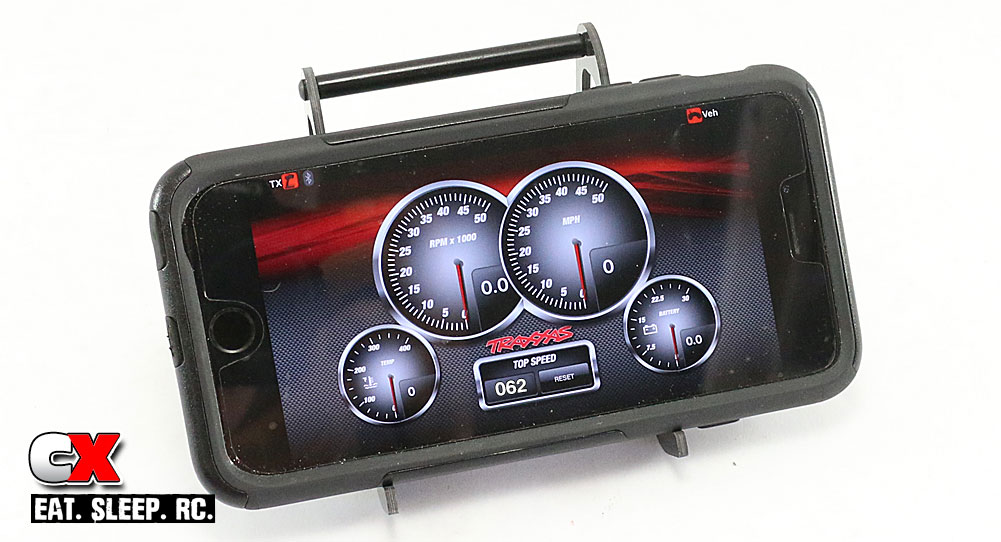 This is where telemetry becomes powerful.
Gear Ratio Optimization
Use speed and temperature data to fine-tune your Gear Ratio:
• High temps = gear down
• Low temps + low speed = gear up
Battery Performance
Monitor voltage drop under load:
• Large drops = weak battery or high demand
Motor Health
Track temperature spikes:
• Consistent overheating can indicate poor gearing or airflow
See these additional articles for Motor Health information:
RC Gear Ratio Explained
RC Motor kV Explained
What Does the C Rating Mean on a LiPo Battery?
Troubleshooting Telemetry Issues
No Data Showing in App
• Check wireless module connection
• Rebind transmitter
No Speed Reading
• GPS not connected or blocked
• Poor mounting location
Temperature Not Updating
• Sensor not properly attached
• Loose connection at expander
Intermittent Signal
• Damaged or pinched wire
• Loose receiver connection
Is the Telemetry Expander Worth It?
It’s Worth It If:
• You want to tune your Rustler for performance
• You run high-power setups (VXL, LiPo)
• You like tracking speed and data
Skip It If:
• You only bash casually
• You don’t use the Traxxas Link app
• You prefer simple setups
For most intermediate users, telemetry is a strong upgrade that adds real insight into how your RC car performs. And, honestly, it’s pretty cool to watch the live settings!
FAQ
Q: Do I need the GPS module?
A: No, but it’s highly recommended if you want accurate speed tracking.
Q: Does telemetry work with brushed Rustler models?
A: Yes, but the data is more limited compared to VXL setups.
Q: Is the telemetry system waterproof?
A: The receiver box is waterproof, but proper sealing is critical after installation.
Q: Will telemetry affect battery life?
A: Minimal impact. Sensors draw very little power.
Q: Can I install telemetry without the app?
A: You can, but you’ll miss most of the benefits.
LINKS
Traxxas, www.traxxas.com

